
 Posted by Pascal Widdershoven on 5-11-2013
We at Kabisa are pretty heavy Jenkins users. We live and breathe Test Driven Development, so a CI server continuously running our tests and building our apps is vital.
About a year ago we switched some projects over to Travis CI, because it had such awesome Github pull request integration.
Nowadays it’s possible to make Jenkins build your GitHub pull requests as well, let me show you how.
Installing the GitHub Pull Request Builder Plugin
To get things going you’ll need to install the GitHub Pull Request Builder Plugin. To do this go to Jenkins → Manage Jenkins → Manage Plugins and click on the Available tab.
Search for GitHub Pull Request Builder and install it.
Configuring the GitHub Pull Request Builder Plugin
After installing the plugin and rebooting your Jenkins it’s time to configure the plugin. Go to Jenkins → Manage Jenkins → Configure System and scroll down to the GitHub Pull Requests Builder section.
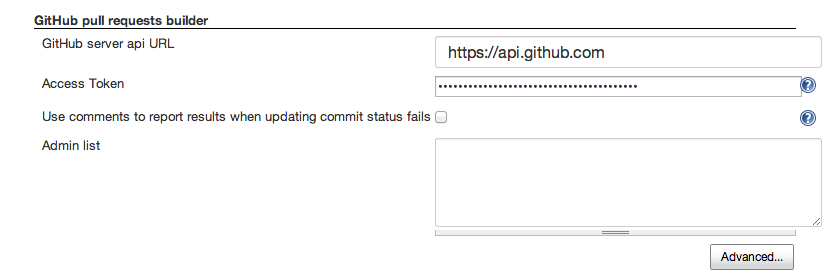
To get going you only need to enter a GitHub access token for the GitHub user you would like to access your GitHub repositories from Jenkins. It’s probably a good idea to use a dedicated user for this purpose.
Beware that the user Jenkins will be using to connect to GitHub must be either the repo owner or have “Push, Pull & Administrative” permissions.
Note: if you don’t have an access token yet you can fill in your GitHub username and password under “Advanced…” and have Jenkins create the access token.
Enabling Jenkins Projects to Build GitHub Pull Requests
Now to actually allow Jenkins to build your projects pull requests we’ll need to setup a new Jenkins Project and configure it as follows:
- Create a new project;
- In the GitHub project field fill in the URL to your GitHub project, e.g.
https://github.com/<username>/<project>/ - Under
Source Code ManagementselectGitand enter the fields as follows
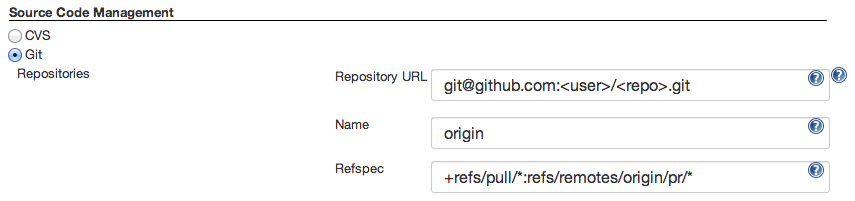
- Under
Build Triggersmake sure to check the following settings and white list some users:
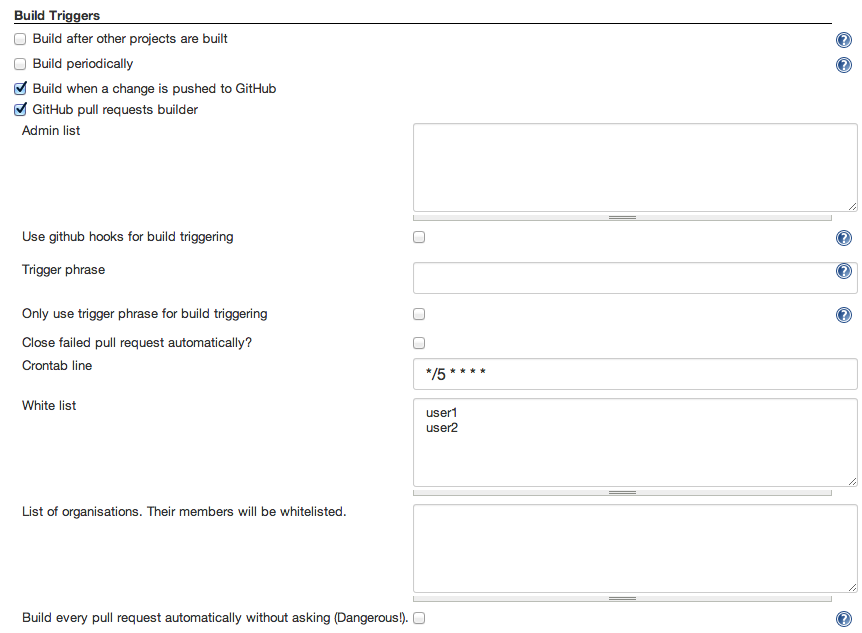
-
Now perform your regular setup of what Jenkins should actually do, e.g. run rspec, cucumber etc. At Kabisa this step usually only involves running
bin/ci, a script under version control running the entire testsuite. -
Now the final step to get things going is to enable the Set build status on GitHub commit post-build action

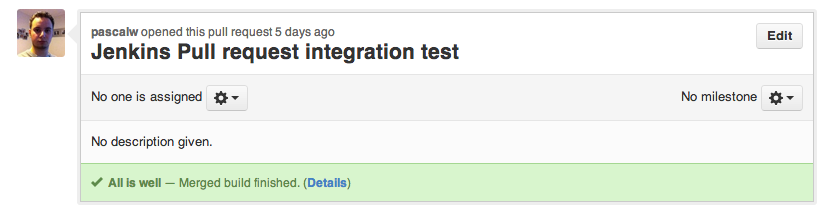
Now whenever you open a new pull request or add some commits to an existing pull request Jenkins will try to perform a merge build and report the result to GitHub. Now all your pull requests should look like this:
Happy coding!